Quick Start
Unweb takes a minute to set up. Download the installer for your system, install it, and open it. A window opens with one stranger in it.
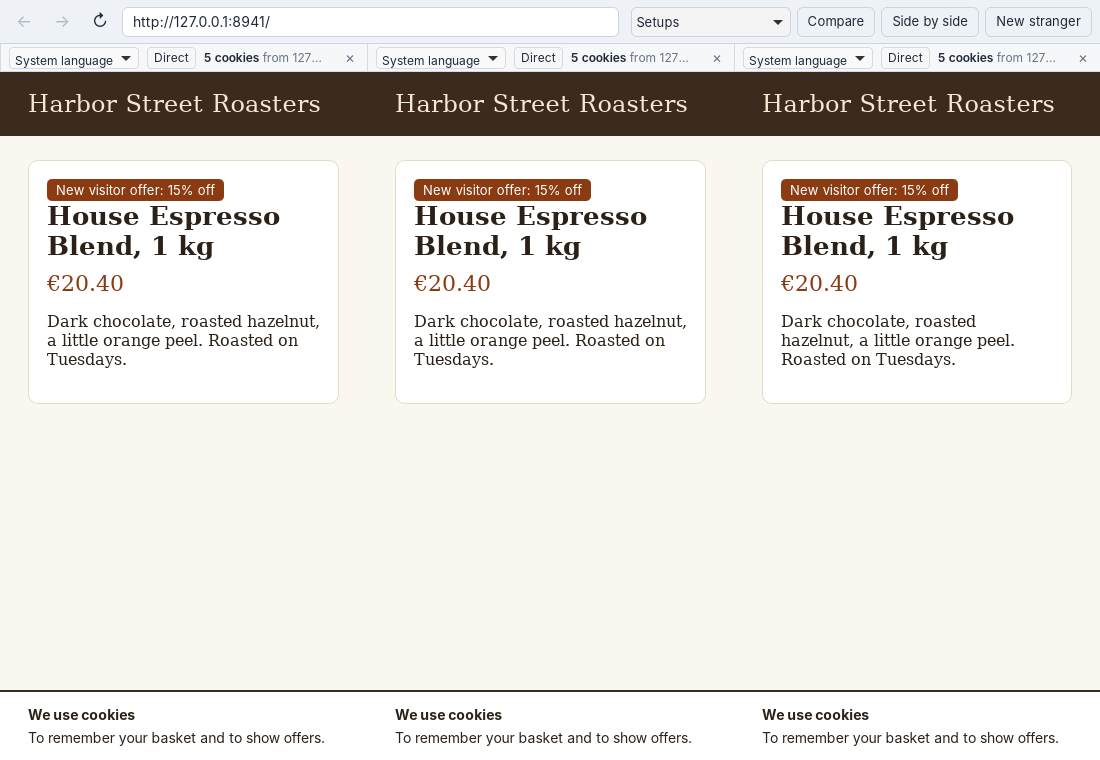
Open a Site
Type an address in the bar at the top and press Enter. example.com opens https://example.com/. Unweb only opens web addresses; words you type aren’t sent to a search engine.
Back, Forward and Reload work as in any browser. They use the engine’s own calls, so a page can’t catch or block them.
Read the Strip
Above each stranger is a thin strip:
- The cookie count, such as “5 cookies from example.com, 2 from 1 other site”. The stranger started with none, so this is exactly what the sites gave it.
- The language, on Windows. Pick another and a new stranger opens in its place, with that language from its first request.
- The location, Direct or a proxy. Click it to give the stranger a proxy (see below).
- × closes that stranger when there is more than one.
Open Strangers Side by Side
Click Side by side to add a stranger next to the others, up to four. Each has a store of its own. The address you type now goes to all of them, and Back, Forward and Reload act on all of them, so you can see whether a site shows them different things.
New stranger opens another window instead.
Give a Stranger a Location
Click Direct in a stranger’s strip and type a proxy you have:
socks5://proxy.example:1080
proxy.example:8080
The second form is an HTTP proxy. Press Enter, and a new stranger opens in place of the old one with everything it loads going through that proxy. Leave the field empty to go direct again. Proxies that need a user name and password don’t work yet.
Save a Setup
When a window has the strangers you want (say, four proxies in four countries), choose Setups, then Save this window as a setup, type a name and press Enter. Next time, pick it under Open in a new window. A setup holds each stranger’s language and location, nothing a stranger saw.
Compare
Click Compare to take a screenshot of every stranger in the window and see them side by side, each captioned with its language, location, cookie count and address. Save image writes the strip as one PNG to your Downloads folder.
Close
Close a window, and its strangers and everything they collected are deleted. You can also start Unweb with an address:
unweb example.com