Unweb 0.4 Signs In to Paid Proxies and Stops a Mac Going Direct When One Fails
Most people who give a stranger a location pay for the proxy, and paid proxies want a user name and password. Unweb 0.3 refused those. It had a worse problem on a Mac, too. When a stranger’s proxy went down, macOS quietly sent its requests direct, from your own address. That’s the one thing a location must never do, and the 0.3 notes said so in bold.
Unweb 0.4 fixes both with one small piece: a relay of Unweb’s own. It sits between the stranger and your proxy, on your own computer. It signs in to the proxy for the stranger, with SOCKS5 user name and password or HTTP Basic, because no web engine here can sign in to a SOCKS5 proxy by itself.
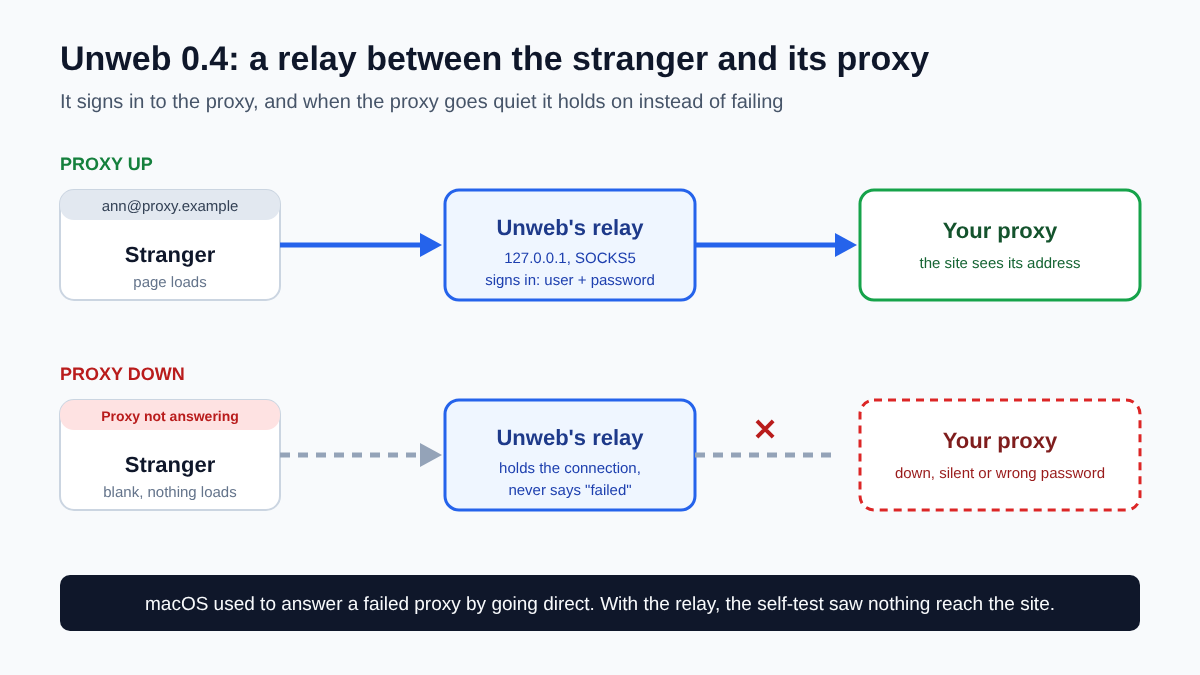
The relay also never tells the engine that the proxy failed. That turned out to be what made macOS go direct. So when your proxy is down, goes silent or refuses the password, the relay just holds on. The stranger’s page is cleared and its strip says why, like “Proxy not answering: nothing loads until it does”. Press Reload once the proxy is back. Unweb checks the proxy first and only then opens the page.
What the Self-Test Saw
The self-test runs the real app against small proxies on the same computer. Some ask for a sign-in, one plays dead, one stops in the middle of a page and one takes connections and never answers. Every site request is logged with the port it came from, so anything that went around a proxy shows up. On macOS, Windows and Linux:
- Strangers with the right password loaded only through their proxies. Strangers with a wrong one sent the site nothing and were blocked.
- A stranger whose proxy was down loaded nothing.
- A proxy that stopped while its page was open got the stranger blocked and its page cleared, with nothing reaching the site. Reload brought it back.
- A proxy that never answered got its stranger blocked in about 9 seconds. Nothing reached the site in the 90 seconds the Mac run watched.
There’s one gap left on macOS. A page opened by an address written as numbers can still skip the proxy. The self-test saw it with the computer’s own local network address, where some requests never reached the relay at all. Sites you visit by name go through the proxy or load nothing, and that’s what a location is for.
Compare Now Saves a Report
Ad-verification and SEO work usually ends with sending someone proof. Compare’s new Save report writes a folder to Downloads: a plain page that opens in any browser, the side-by-side strip, each stranger’s screenshot and a JSON record. The record has the time, the address you typed and, for each stranger, its language, location, cookie counts and address. It never holds a proxy’s user name or password.
Worth Knowing
Saved setups now keep a proxy’s user name and password, so a setup with four paid proxies opens without asking again. The file is plain text, readable only by your user on Linux and macOS. While a stranger with a relay is open, other programs on your computer could send traffic through it too, so don’t save a proxy password on a computer you share. Through the relay an HTTP proxy is asked to tunnel every connection, so one that only tunnels to port 443 won’t open plain http:// pages.
Unweb 0.4 is on the download page, and the reference has the details.