A Search Page Puts a Shop You Visited Above Everything Else
If you work in search, you’ve probably had this argument. Your page ranks third. A colleague says it ranks first. You’re both looking at the same query on the same day, and you’re both right, because the results were shaped by what each of you did before.
That makes checking rankings from your own browser close to useless. What you need is the page a first-time searcher sees, next to the one a returning visitor sees.
This case study uses a made-up search page. It remembers, with a cookie, that a visitor has been to a shop before, and on the next search it moves that shop to the top and labels the list as based on recent visits. Open it in Unweb, reload once, then click Side by side.
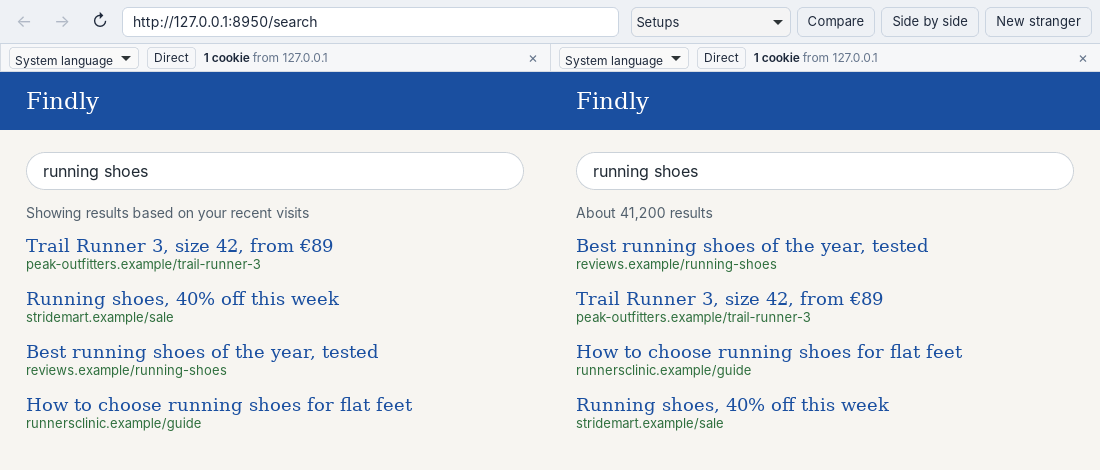
The same query twice. On the left a visitor the site has seen; on the right one it hasn’t.
What It Shows
Four results, the same four on both sides, in a different order. For the returning stranger the shop jumps from second to first, and a sale page climbs from fourth to second. The review guide a newcomer sees at the top drops to third.
One cookie from the site in each strip. One holds a visit, the other holds nothing yet. Every other difference on the screen comes from that.
Trying It on a Real Site
Open the search you care about in two strangers, or in three with a different location each, and save the screen with Compare. That’s the unpersonalised result, with nothing of your own history in it. Close the window and it’s gone. Run it again tomorrow and you start from zero again.
A real search engine also looks at your language, your rough location and the device. Strangers on one computer share the device, so they won’t catch rankings that depend on it.
The search page is in examples/case-studies. Run python3 server.py and open http://127.0.0.1:8950/search.